

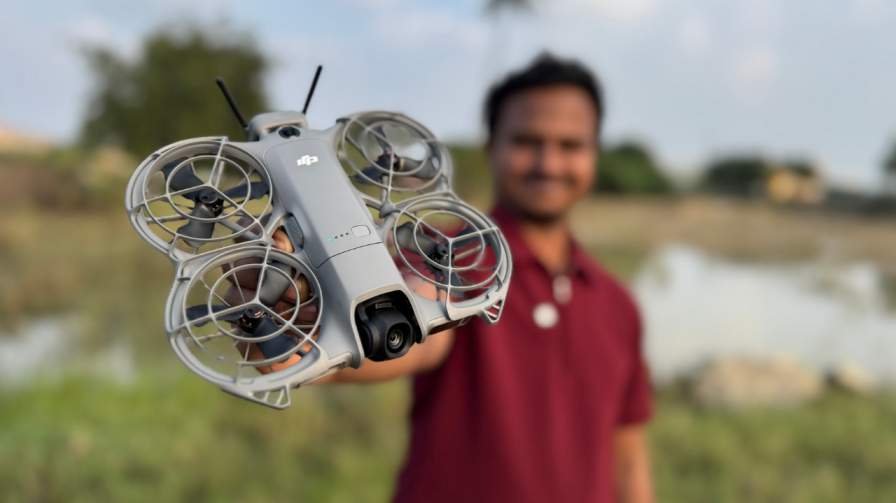
DJI Neo 2 — tiny body, big tricks: camera, battery, obstacle avoidance & why it matters
DJI’s Neo line has always been about one thing: make drone flying easy and fun without sacrificing the features people actually use. The Neo 2 doubles down on that promise — a pocketable, beginner-friendly quad that borrows smarter sensing, a more capable camera, and thoughtful touches (like onboard storage and palm takeoff/return) that remove friction from casual flights. Below is a deep-dive into the Neo 2’s camera, battery, obstacle avoidance, and other standout features, plus a compact comparison with the most relevant competitors so you can see where it shines — and where a step-up or different model might make sense.
The camera: what it shoots and why it matters
Sensor, resolution and stabilization
- The Neo 2 uses a 12 MP, 1/2-inch CMOS sensor coupled with a 2-axis mechanical gimbal and electronic stabilization. That sensor size is small compared with pro-level drones, but it’s been tuned to deliver clean, social-ready images and surprisingly crisp 4K video for a drone of this size. (DJI Official)
Video specs and shooting modes
- Neo 2 records up to 4K video (including higher-frame-rate options for smooth slow motion) and supports vertical shooting modes that make it quick to create Reels or TikToks without heavy cropping. The combination of the mechanical gimbal and digital stabilization helps keep footage usable even when the drone is moving or encountering light wind.
- Download and Watch the video shot on DJI Neo 2 4k 60 FPS Video Below
The QuickShot Circle mode is one of the intelligent automated flight options built into the DJI Fly app for the Neo 2. When you select Circle, the drone will automatically fly in a smooth circular path around a subject you’ve chosen, keeping that subject centered in the frame throughout the movement. This makes it easy to capture dynamic cinematic footage — like orbiting around a person, vehicle, or scenic landmark — without manually controlling flight sticks. The radius and height of the circle are based on where the Neo 2 is positioned when you initiate the QuickShot, so placing it at the right distance before starting helps you get the look you want
Download and Watch the Quickshot Circle video shot on DJI Neo 2 4k 60 FPS Video Below
Practical benefits for creators
- What this translates to in the field:
- Quick social clips out of the box (vertical video support, QuickShots and SelfieShot modes).
- Cleaner handheld-style footage when using gesture or palm-control modes.
- Enough detail and dynamic range for day-to-day vlogging, travel content, and family footage — not cinema-level, but excellent for the target audience.
Battery & flight time — realistic expectations
Official flight time figures
- DJI quotes around 18–19 minutes of flight time under ideal test conditions for the Neo 2 (slightly less when propeller guards are fitted). That positions it as a short-mission drone: quick shoots, less waiting between batteries.
Real-world considerations
- Expect lower numbers than lab conditions: wind, aggressive filming (hovering/fast maneuvers), and active tracking all reduce real battery runtime. In practice, plan for 12–16 minutes of usable recording time per battery when you’re filming with stabilization and following subjects.
What DJI did to soften the pain
- DJI bundles extra convenience features to reduce the friction of short flights: reasonably fast battery swaps, optional Fly More/Combo kits with extra batteries, and onboard storage so you don’t waste time swapping cards between flights. For casual users, the tradeoff of small size for shorter flight time is often worth the portability.
Obstacle avoidance & sensing — safety without the fuss
Omnidirectional sensing + LiDAR/infrared support
- Neo 2 steps up from its predecessor with omnidirectional visual sensing enhanced by forward-looking LiDAR and lower-facing infrared sensors. That combination gives it better short-range depth perception and more reliable ActiveTrack behavior than many other ultralight “selfie” drones.
Hands-free return & palm landings
- One of the Neo 2’s most approachable features is “Return to the palm” and palm-based takeoff/landing: the drone can detect your hand or palm and return to it safely, then settle down for a stable landing. That makes it ideal for solo creators who want to launch and collect the drone without an assistant.
Where it still needs pilot care
- Despite the impressive sensing for its size, like all consumer drones the Neo 2 can struggle with very thin obstacles (wires, twigs), highly reflective surfaces, or extremely crowded/fast-moving scenes. The avoidance system noticeably raises safety and confidence for casual users, but it’s not a full replacement for manual attention.
Other key features that make the Neo 2 user-friendly
- Onboard storage: ~49 GB internal storage on some configurations — great if you don’t want to fuss with microSD cards for casual shoots.
- Gesture & voice controls: for selfie-style hands-free capture and easy framing without a controller.
- Compact, protected design: integrated propeller guards and a low weight (~151 g) make it easy to fly in more places and reduce damage risk from bumps.
- Improved tracking: faster and more stable ActiveTrack for running, cycling, or moving subjects — a major improvement over many earlier entry-level models.
How the Neo 2 compares to nearby rivals
Below are three practical competitor comparisons so you can see tradeoffs at a glance.
Competitor snapshot — quick bullets
- DJI Neo 2
- 12 MP 1/2″ sensor, 4K video, 2-axis gimbal + EIS, omnidirectional sensing + LiDAR, ~18–19 min flight time, ~49GB internal storage, palm takeoff/return. Strong beginner ergonomics and safety.
- Autel EVO Nano+
- 1/1.28″ 50MP sensor, 4K/30fps video, 3-axis gimbal, excellent low-light capability due to RYYB filter and larger sensor; flight times in similar small-drone range (but more oriented to higher photo quality). A better choice if stills are the absolute priority.
- DJI Flip (or other Flip/Compact models)
- Larger 1/1.3″ sensor on certain Flip models, 3-axis gimbal, longer flight times (up to ~30 min on some models), and in some cases more advanced transmission ranges — but generally heavier and more expensive. Flip models focus on vloggers who want higher image quality while staying compact.
Practical comparisons — who should pick what
- Buy the Neo 2 if you want an ultra-easy, lightweight drone that works great for solo selfie shots, social video, and safe beginner flights — value and simplicity over raw image fidelity.
- Choose Autel EVO Nano+ if still-photo quality and low-light performance are top priorities — its 50MP sensor and RYYB array deliver better photos in tougher light.
- Consider the Flip or Mini-class flies if you want better all-round imaging and longer flight times and are willing to carry slightly larger hardware (and pay more).
Bottom line — who the Neo 2 is for and caveats to know
The DJI Neo 2 nails the “fun, safe, and social” brief. It’s ideal for first-time flyers, casual travelers, and content creators who want quick, hands-free shots and an extremely portable setup. Its improved obstacle avoidance and palm-return features make solo shooting simple — and onboard storage plus gesture controls remove common pain points like lost microSD cards or needing a second person to catch the drone. (digitalcameraworld.com)
Caveats:
- If you need long continuous flights (search & survey style) or the absolute best image quality for professional stills, the Neo 2’s short battery life and modest sensor size mean you’ll be better served by larger, more expensive models.
- Availability in the U.S. has been limited compared with other regions — check local DJI store policy and warranty coverage before buying if you’re in the U.S. or buying from an import channel.
